

CCD Installation
CCD1 Installation
Section titled “CCD1 Installation”We recommend the use of our pre-installed SDcard - instructions found here. For CCDv2 read here.
Mounting
Section titled “Mounting”It is recommended to use the case provided for proper mounting!
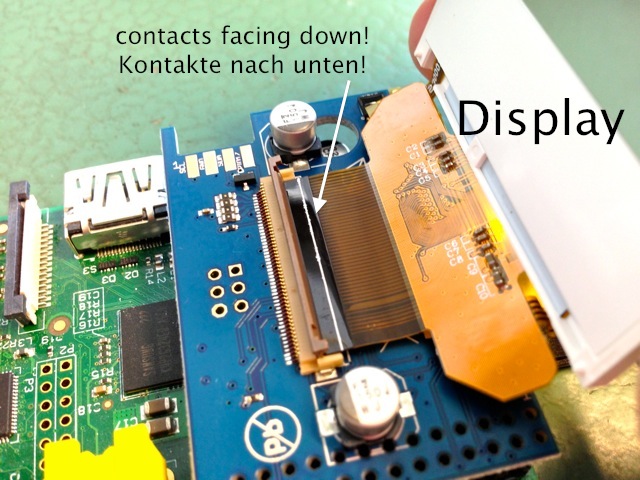
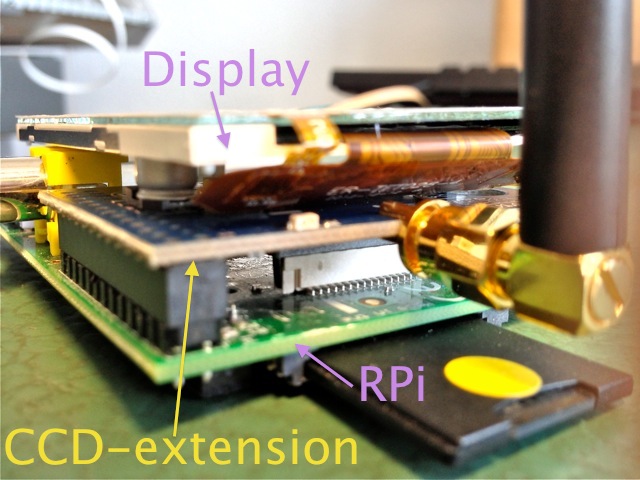
TFT and touchscreen
Section titled “TFT and touchscreen”You will need to patch and re-compile your kernel and modules as described here or use an RPi-image with TFT support.
Empty or delete /etc/modprobe.d/raspi-blacklist.conf Than you shall configure /etc/modprobe.d/busware-ccd.conf:
options ads7846_device cs=1 speed=500000 model=7846 pressure_max=255 x_min=250 x_max=3780 y_min=160 y_max=3930 x_plate_ohms=60 gpio_pendown=25 keep_vref_on=1 verbose=2 swap_xy=1 options fbtft_device name=ili9341fb gpios=reset:23,led:24 rotate=1 speed=16000000 options lirc_rpi gpio_in_pin=18 gpio_out_pin=0
Make sure your /etc/modules contains:
fbtft_device ili9341fb snd-bcm2835 lirc_rpi ads7846_device
The /boot/cmdline.txt file should look like:
dwc_otg.lpm_enable=0 console=tty1 root=/dev/mmcblk0p2 rootfstype=ext4 elevator=deadline rootwait fbcon=map:10 fbcon=font:ProFont6x11
REBOOT…
User-Hinweis:
Section titled “User-Hinweis:”Und beim RPI-Image vom (3.1.2014) welches ich allerdings von der verlinkten notro-Seite (https://github.com/notro/fbtft/wiki) heruntergeladen hatte, hat sich das Paket des Displaytreibers geändert …
Die busware-ccd.conf muss nun “options fbtft_device name=mi0283qt-9a gpios=reset:23,led:24 rotate=1 speed=16000000” enthalten, nicht mehr “ili9341fb” !
Ebenso hat sich der Modulname von “ili9341fb” in “__fb_ili9341**” geändert!
Was sich auch auf die Befehle zum Ein/Ausschalten des Backlight niederschlägt: “echo 1 > /sys/class/backlight/**fb_ili9341__/bl_power”
starting X11:
FRAMEBUFFER=/dev/fb1 startx
apt-get install xinput for correcting the touchscreen axis:
DISPLAY=:0 xinput —set-prop ‘ADS7846 Touchscreen’ ‘Evdev Axis Inversion’ 0 1
put this line into /etc/X11/xinit/xinitrc
Be aware that the touchscreen is not exactly calibrated yet.
Backlight
Section titled “Backlight”switch on:
echo 0 > /sys/class/backlight/ili9341fb/bl_power
switch off:
echo 1 > /sys/class/backlight/ili9341fb/bl_power
empty or delete /etc/modprobe.d/raspi-blacklist.conf
modprobe i2c-bcm2708 echo ds1307 0x68 > /sys/class/i2c-adapter/i2c-1/new_device hwclock
Radio interface
Section titled “Radio interface”The module is shipped with “culfw” installed and tested! You need to free-up the serial line used by CCD. Remove any references to ttyAMA0 in:
- /etc/inittab - comment or delete: T0:23:respawn:/sbin/getty -L ttyAMA0 115200 vt100
- /boot/cmdline.txt - and reboot! By default the radio is held in RESET which is connected to GPIO17. You need explicitly pull GPIO17 HIGH to un-reset the radio:
if test ! -d /sys/class/gpio/gpio17; then echo 17 > /sys/class/gpio/export; fi echo out > /sys/class/gpio/gpio17/direction echo 1 > /sys/class/gpio/gpio17/value
By doing this the LED@CCD should start blinking.
LOW level at GPIO22 is used to call the (avr109) bootloader.
The CCD is shipped with “culfw”-firmware flashed and testet.
after freeing the serial line and un-resetting the radio as descibed above you may add in fhem.cfg:
define CCD CUL /dev/ttyAMA0@38400 1234
The IR receiver is connected to GPIO18
modprobe lirc_rpi gpio_in_pin=18 gpio_out_pin=0
test by pressing a key on your remote after you did:
mode2 -d /dev/lirc0