

ROT Installation
ROT Installation guide
Section titled “ROT Installation guide”mounting the board
Section titled “mounting the board”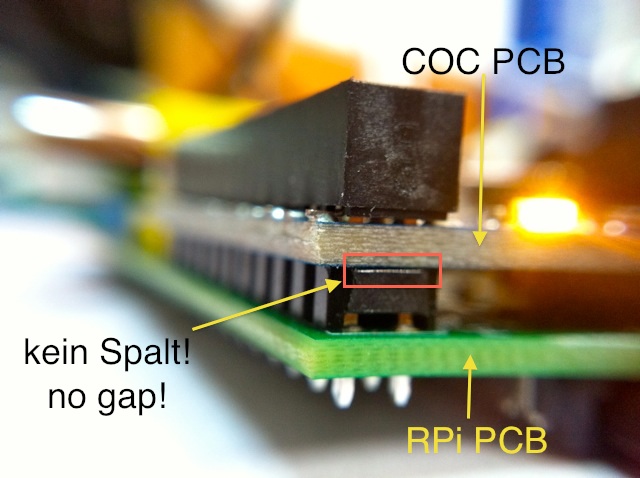 Make sure there is no gap left. Press the two PCB so you can hear/feel a litlle “click” …
RPi - 512MB special note:
Section titled “RPi - 512MB special note:”At the 512MB version board of RPi the connector handles have become very big. The hole provided at the ROT is 2.9mm only!! Therefor the handle needs to be removed:
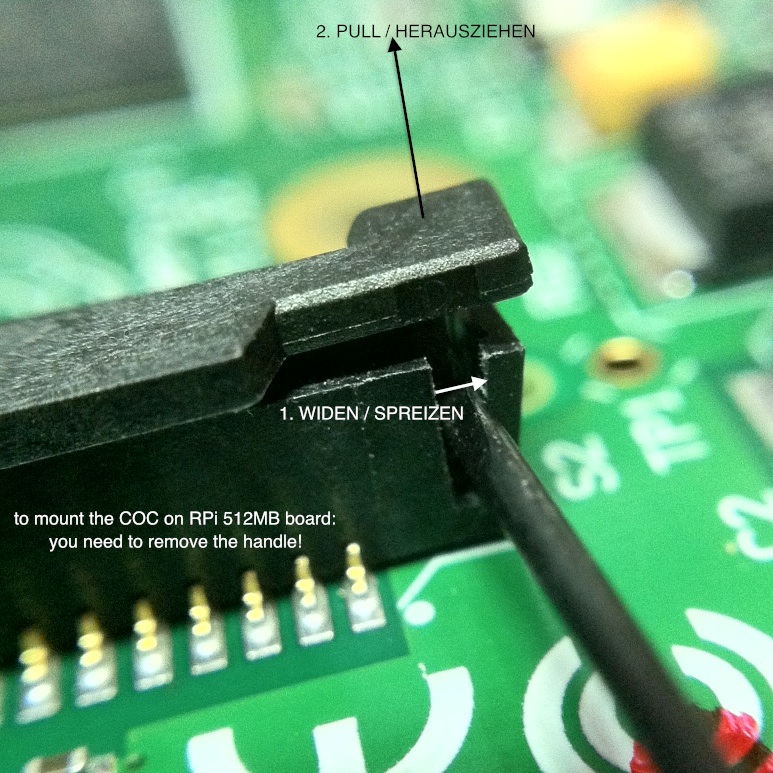 UPDATE: The newest RPi charge even uses a 3mm thick connector. This is about 0.1mm too big for the slot at ROT. In case you got one of those RPis you must rasp away some micrometers of ROTs slot to make it fit.
System
Section titled “System”The i2c-bus number used below might differ depending on yr RPi version or kernel
TPUART - EIB/KNX bus access
Section titled “TPUART - EIB/KNX bus access”You need to free-up the serial line used by ROT remove any references to ttyAMA0 in:
- /etc/inittab - comment or delete: T0:23:respawn:/sbin/getty -L ttyAMA0 115200 vt100
- /boot/cmdline.txt - and reboot!
RPI3 + JESSIE:
add to: /boot/config.txt dtoverlay=pi3-miniuart-bt
change: /boot/cmdline.txt dwc_otg.lpm_enable=0 console=tty1 root=/dev/mmcblk0p2 rootfstype=ext4 elevator=deadline fsck.repair=yes rootwait
commands to issue: sudo systemctl stop serial-getty@ttyAMA0.service sudo systemctl disable serial-getty@ttyAMA0.service sudo reboot
then:
sudo -u pi eibd -i -D -T -S -e 1.1.251 tpuarts:/dev/ttyAMA0
(For Banana Pi the device is called: /dev/ttyS2)
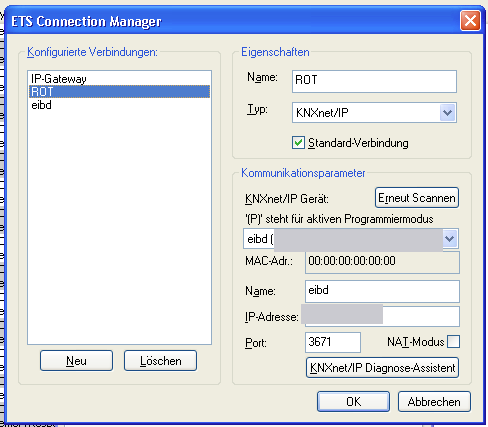
ETS configuration to access ROT - use SCAN-button to find IP-address:
Onewire
Section titled “Onewire”echo ds2482 0x18 > /sys/bus/i2c/devices/i2c-0/new_device
use owhttpd or similar to access bus
EEPROM
Section titled “EEPROM”echo “24c02 0x50” > /sys/class/i2c-adapter/i2c-0/new_device
try:
hexdump -C /sys/bus/i2c/devices/0-0050/eeprom
echo ds1307 0x68 > /sys/class/i2c-adapter/i2c-0/new_device
use: hwclock
compiling eibd on RPi
Section titled “compiling eibd on RPi”wget http://www.auto.tuwien.ac.at/~mkoegler/debian/pool/main/p/pthsem/pthsem_2.0.8.tar.gz tar -xzvf pthsem_2.0.8.tar.gz cd pthsem-2.0.8 ./configure make install ldconfig -v
cd ..
wget http://www.auto.tuwien.ac.at/~mkoegler/debian/pool/main/b/bcusdk/bcusdk_0.0.5.tar.gz tar -xzvf bcusdk_0.0.5.tar.gz cd bcusdk-0.0.5 ./configure —enable-onlyeibd —enable-tpuarts —enable-eibnetip —enable-eibnetipserver make install