
SixBack SIXBACK
Brings the six preset buttons on Bose SoundTouch speakers back to life after the manufacturer shut down its cloud — one ESP32 stick on your LAN, no account and no server.
Version v0.8.45 runs on: ESP32, ESP32-S3, ESP32-C3, ESP32-C6, ESP32-C5
Bose shut down the SoundTouch cloud on 6 May 2026, and with it the six preset buttons on speakers whose firmware can no longer be updated. SixBack speaks just enough of that cloud protocol for the speaker to keep working — from an inexpensive ESP32 stick on your own network. No subscription, no account, no servers involved.
The project was formerly published as BoseFix32; the name changed to make its identity independent of any trademark. It is an independent open source project and not affiliated with the manufacturer.
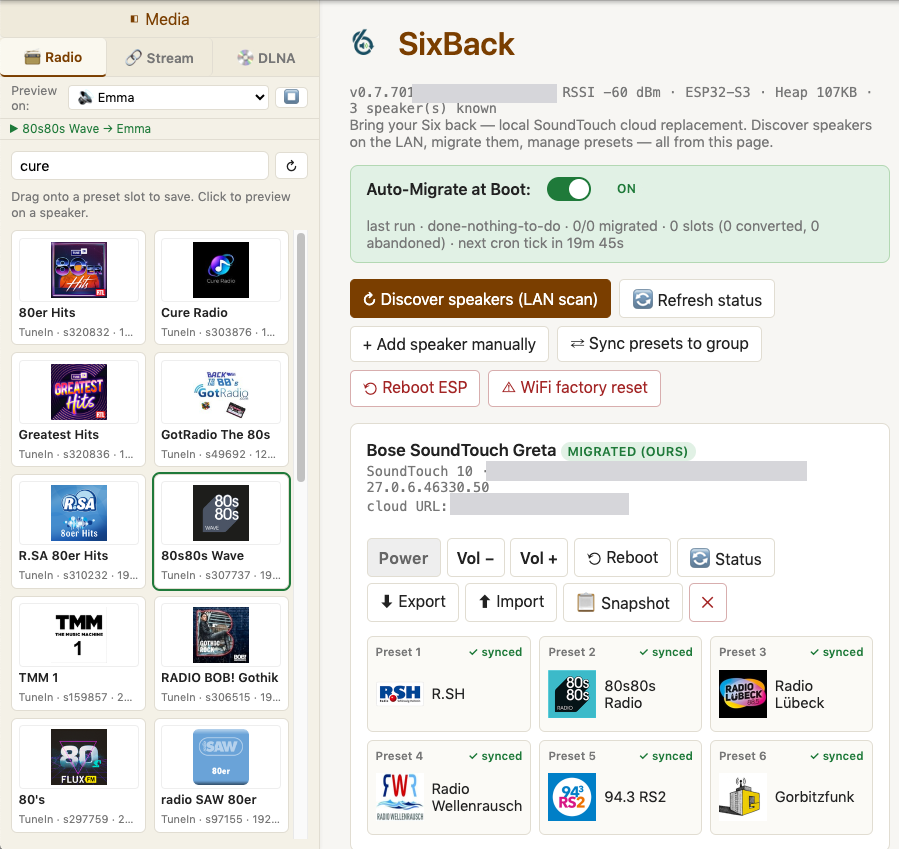
Features
- The six buttons work again — press 1–6 on the speaker and internet radio plays.
- Existing presets are kept. They are imported from the speaker on first contact instead of being overwritten.
- Radio, Spotify and DLNA — search TuneIn and RadioBrowser, put a Spotify playlist on a button, or browse a DLNA/UPnP library and drop a track on a slot.
- Several speakers from one stick, including zones, multiroom and stereo pairs through the speaker’s own protocol.
- Automatic migration, and a switch to stop it. A freshly flashed stick discovers eligible speakers, normalises their presets, rewrites their cloud URLs and restarts them. Since v0.8.44 there are twenty seconds to switch that off before the first speaker is touched — and switching it off during that window now actually cancels the pass.
- Two sticks on one network do not fight. Each probes any foreign cloud URL it sees and leaves a speaker to its current owner if the answer looks like another SixBack.
- Nothing to host — the web interface runs on the stick itself.
Requirements
- An ESP32 board — ESP32, C3, C6, C5 or S3, flashed from the browser.
- Speakers the automatic migration accepts: SoundTouch 10, 20 and 30 on firmware
27.0.6.xor27.0.3.x. Other models can be driven manually. - A LAN. No server, no account, no cloud.
Getting started
Open sixback.io in desktop Chrome or Edge and click Connect. The page detects the chip on the connected board and writes the matching factory image in one shot; right after flashing it hands over Wi-Fi credentials over Improv. The stick then serves its interface at http://sixback.local/, with the auto-migration switch at the top.
Limits
Storage is the constraint at scale: the standard layout runs out at roughly nine speakers, and a full partition refuses every further write — including the one that would free space again. For larger installations there is SixBack-Max, the same firmware on a layout with about eleven times the entries. It needs 16 MB of flash (ESP32-S3 or ESP32-C5), is a separate build with its own update path, and installing it clears the stick’s stored presets — export them first; the speakers keep theirs.
Per-feature state and the full release history are in STATUS.md.
Discussion
Questions, experiences, bug reports? Discussion happens in GitHub Discussions : Open the discussion on GitHub ↗